
Live markets
Updates every secondIndia (NSE)
,
Singapore (SGX)
,
US (NYSE)
,
US (NASDAQ)
,
Overlayfollowsyouacrosswebsitetabs.KeepthelatestBUY•SELL•HOLDvisiblewhileyoubrowse.Overlayfollowsyouacrosswebsitetabs.KeepthelatestBUY•SELL•HOLDvisiblewhileyoubrowse.
Tradelo AI on TradingView, Groww, Chartmini, and Indstocks: direction, levels, and a short why in plain English. Track multiple stocks, keep context while switching tabs, customize everything with resize/layout controls, and use 11+ UI languages (Indian + global).
One extension. Many stocks. Everywhere you browse.
Follow several symbols at once, jump between chart tabs, and keep your latest signal context when you open other sites, you do not have to stay on a single page. The overlay offers 11+ interface languages (Indian and global); the same workflow runs on Groww, TradingView, Chartmini, Indstocks, and our other supported chart pages.
Multi-stock workflows: monitor parallel charts and tickers without losing your decision layer.
Cross-tab continuity: your latest on-chart readout can stay visible while you read news or research elsewhere.
11+ UI languages in the extension, English, Hindi, Gujarati, Marathi, Tamil, Bengali, French, Urdu, Arabic, Spanish, and more Indian locales via the language menu.
One install across supported hosts: no separate tool per site; open any supported chart and the overlay behaves the same way.
Accuracy tuned for Indian markets
Our signal engine prioritises NSE & BSE context, multi-timeframe trend alignment, regime-aware scoring, and session accuracy you can review beside the candles. Global markets are supported; India is where we invest the deepest calibration.
Also available on mobile: install the PWA for quick sign‑in, watchlist signals, and alerts.Installs from the Chrome Web Store in one step. Approve the permissions so the extension can read chart pages you open and load market data in the background.

IN
MTF
Live
4+
The tool we wish existed earlier
“The hardest part of trading isn’t finding more data it’s getting clarity fast enough to act with confidence.”
“We built Tradelo AI to compress noise into a focused on‑chart overlay: direction, drivers, and a clean risk plan so you can trade the plan.”
, Tradelo team
Faster than the old way, without leaving your chart
Traditional workflows often mean extra tabs, screenshots, and dashboards that do not line up with the broker you actually use. Tradelo AI is built around one idea: clarity should show up where you place risk, on the live chart.
On-chart, not in another tab
Instead of bouncing between research pages and your order ticket, the extension paints BUY, SELL, and HOLD context on the price action you are already watching on supported sites.
Speed that still explains itself
We compress multi-timeframe structure, liquidity-style cues, sentiment, and calendar risk into a readable overlay so you spend less time assembling a thesis and more time trading the plan.
Different from typical retail habits
Many traders still chase headlines in chats, stack conflicting indicators, and improvise mid-session. A consistent on-site overlay gives bias and FOMO less room to rewrite the plan when volatility spikes.
Why the extension matters
Because it runs in the browser where you already bank and trade, you keep one context: the same login, chart zoom, and risk controls, with signals that refresh as conditions change.
Works where you already chart, and keeps your latest decision layer visible as you move across tabs.
The same overlay on Groww and TradingView
Straight from the extension: regime tags, HOLD and BUY and SELL context, risk callouts, multi-stock workflow continuity across tabs, resizable controls, and language-ready UI, still on the chart you already use.
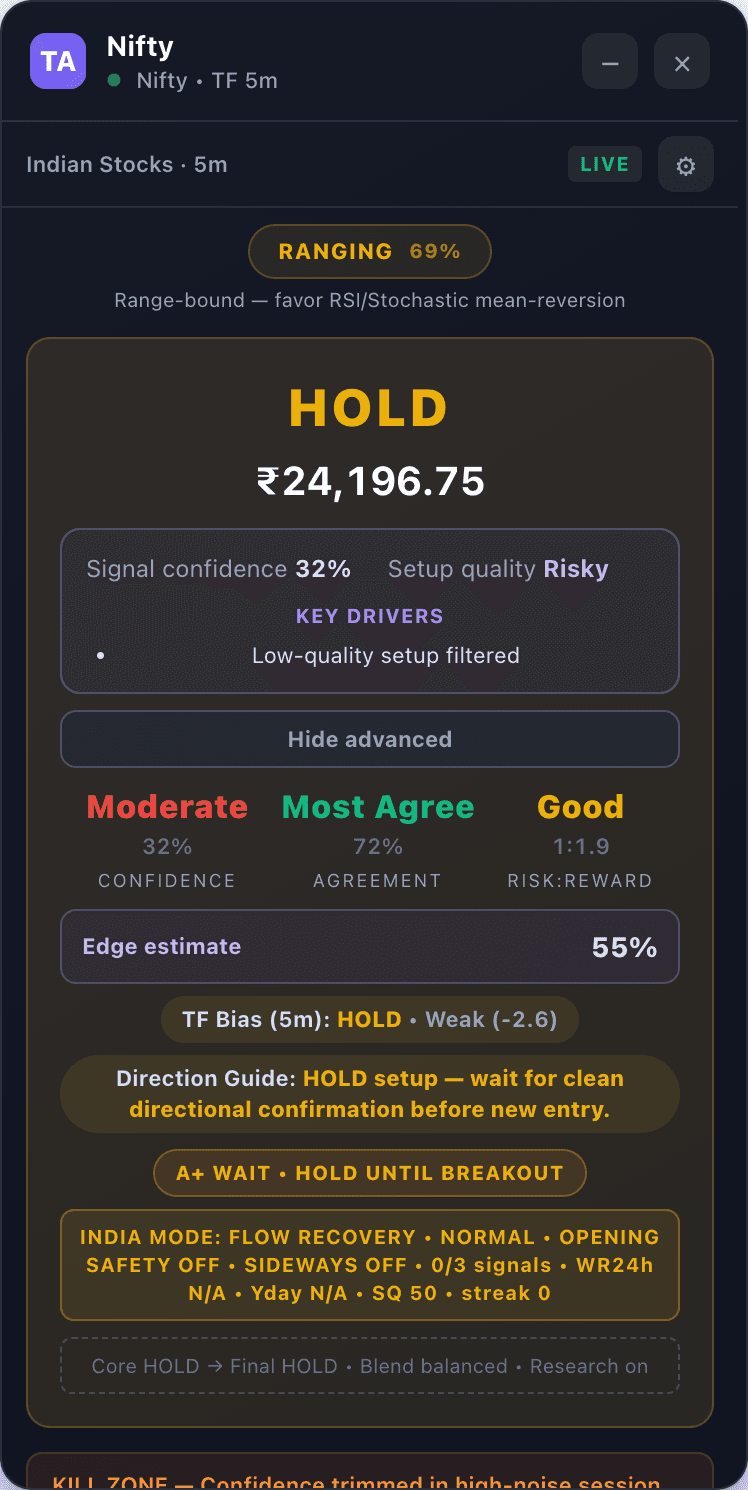
Signal summary
Quick BUY/SELL/HOLD with price, confidence, and the highest-signal drivers.
Each step highlights what matters most on the panel so you can understand the decision quickly without switching tabs.
Everything in one on-chart workflow
For traders who want serious context without ten browser tabs. Built for multi-stock scanning and fast tab switching, with India-first depth plus US, Singapore, and crypto paths when you need them. Resize and personalize the overlay to match your workflow, with 11+ UI language options.
Multi-timeframe stack
2m, 5m, 1h (and 45m where available) with confluence scoring, not one lonely indicator screaming buy or sell.
Regime-aware engine
Trend, chop, news-heavy days, session quirks. Weights shift with the tape instead of forcing the same template.
News + macro sentiment
Regional and world feeds blended into the signal with explainable reasoning lines.
Risk you can see
Stops, targets, position sizing from capital & risk %, plus warnings when context is hostile.
Voice & session tools
Alerts, session accuracy, trade history, and paper-style tracking built for monitoring multiple symbols during live market hours.
Resizable, customizable overlay
Resize the panel, tune chart settings, switch modes, and adapt layout controls so the overlay fits your screen and trading style.
11+ language-ready interface
UI supports English, Hindi, Gujarati, Marathi, Konkani, Tamil, Arabic, Bengali, Urdu, Punjabi, and Sindhi so teams can work in Indian and global languages.
Optional ML confidence
Export labeled rows, retrain in Python, ship a Random Forest bundle for in-browser AI scoring.
How we're different
We are not trying to replace your broker or promise guaranteed returns. We are trying to cut clutter and put explainable context where you already make decisions.
Versus noisy tip channels
No forwards, no hype tickers. You get structured levels, regime tags, and reasons on the same chart you would actually trade.
Versus ten-tab research
We fold news, calendar risk, and market depth into one sidebar instead of hopping across sites while price moves.
Versus black-box “AI buy”
Transparency scores and reasoning lines show what agreed or disagreed with the signal, not a single magic score.
Versus slow end-of-day stacks
Built for active sessions: refresh paths and voice hooks are aimed at the open chart, not yesterday's email digest.
Why choose us
Practical reasons traders keep Tradelo AI pinned next to charts: multi-stock scanning, cross-tab continuity, customizable layout, and language-ready workflows.
Stays on your chart
You never export symbols to a random site. The panel sits beside Groww, TradingView, Chartmini, or Indstocks like part of the workspace, and supports multi-stock scanning across tabs.
India-first, global when you need it
VIX, flows, GIFT Nifty, and local news weighting for Indian names. Upgrade to Global Pro for US, Singapore, and crypto paths in the same stack.
You can question the call
Confluence, transparency bars, and written reasons mean you are not forced to trust a single headline or emoji signal.
Risk is visible, not hidden
Stops, targets, and size hints are surfaced so you can align them with your own rules before you act.
You control the interface
Resize the overlay and use chart settings, market mode, timeframe, and voice controls to match your personal execution workflow.
Optional ML you own
Export resolved trades, retrain in Python, and ship a forest bundle back into the browser if you want a custom gate.
Pricing in INR for India
Trial Global Pack (₹399, 2 days, one-time) or Monthly Global Pack (₹1,999/mo, auto-renews). Start with Trial, then choose monthly when you are ready.
Trust is built with clarity
We keep signals readable and explainable on the chart, so you can make faster decisions during the India session without second‑guessing.
India-first coverage
Built for India-first workflows (Groww + TradingView). Tuned for the cash market rhythm, NSE session: 9:15–15:30 IST (Mon–Fri).
Signals you can validate
Not just “BUY/SELL”. The overlay shows direction + context + confirmation beside price, so decisions stay explainable during fast intraday moves.
Risk-first workflow
Signals are inputs, not orders. Use them as filters, then apply your risk rules. No hype, no guarantees, just a cleaner decision workflow.
Always improving
We iterate based on real trader feedback in India. Small improvements shipped often, so it gets better without breaking your flow.
Social proof that feels real
A good signal is useful only if you can act on it. These are short, practical reviews from real trading styles, intraday, delivery, and multi‑market.
“The overlay is the fastest way I’ve found to stay disciplined. I don’t need 10 indicators, the key drivers are right there.”
Amit
“The session accuracy and confirmation logic reduced my impulse trades. It feels like a focused checklist beside the candles.”
Riya
“I like that US + crypto are supported, but India is clearly where it’s tuned best. Clean UI and solid risk plan output.”
Karan
Built for clarity, speed, and control
Free up your time to focus on the trade. We make the workflow easy, follow the signal, understand the “why” beside price, and execute with clarity.
No black box: you see the direction, context, and confirmation on chart.
Built for real trading: fast to read during sessions, clean enough to trust under pressure.
You stay in control: treat signals as filters, then apply your risk rules.
Fast refresh loop
Built for active sessions: overlays update with your chart context instead of batch end-of-day emails.
Explainable signals
Reasoning lines and breakdowns. Not a black-box “AI says buy” sticker over your candles.
Your keys, your broker
Analysis runs in your browser context on pages you open. We don't replace your broker's login or custody model.
Customizable for real workflows
Resize the overlay, switch settings quickly, and use 11+ UI languages while tracking multiple symbols across tabs.
Animated charts + a simple decision flow you can understand at a glance
These visuals are interactive demos to make the workflow tangible: confidence, stability, and context. (UI demo data.)
Signal lens
Switch the view to see different “signal quality” dimensions.
Decision flow
A small animated diagram showing the “scan → validate → execute → review” loop.
1) Scan
Find candidates fast (screener / watchlist).
2) Validate
Confirm bias + structure; define invalidation.
3) Execute
Size correctly; follow the plan.
4) Review
Log outcomes; improve rules & risk.
Explore algo trading, AI signals, India, US, Singapore, and crypto workflows
These pages are built around high-intent search themes traders actually use when comparing algo trading software, chart-side AI signals, and market workflows across India, the US, Singapore, and crypto.
A lightweight Chrome extension for on-chart trading signals: clear BUY · SELL · HOLD with context on Groww, TradingView, and more (India-first; US, Singapore, crypto supported).
Read more →Stock signals Chrome extension for on-chart clarity: a lightweight workflow with BUY · SELL · HOLD and context on the charting surfaces traders already use.
Read more →AI stock signals extension for traders who want chart-side bias and context: lightweight workflow with clear direction labels on chart.
Read more →Trading indicator Chrome extension for traders who want clearer decisions on chart: lightweight signals and context beside candles.
Read more →TradingView Chrome extension signals for traders who want on-chart BUY · SELL · HOLD and context beside candles in a lightweight workflow.
Read more →Groww Chrome extension signals for Indian traders who want on-chart clarity: lightweight workflow with direction and context beside candles.
Read more →Intraday signals extension for India: a lightweight on-chart workflow focused on bias + confirmation with clear direction labels beside candles.
Read more →Crypto signals extension for traders who want chart-side bias and context: lightweight workflow for major coins and regime shifts.
Read more →Latest guides for algo trading, AI signals, India and US workflows
Practical checklists and comparisons you can apply immediately. Built to match real search intent and real trading workflows.
A practical comparison: what to expect from free stock signals vs paid products, and how to judge value without chasing promises.
2026-04-14
A practical India-focused screener workflow: scanning, chart validation, and a repeatable shortlist review process.
2026-04-14
How to use signals around US earnings: avoid whipsaws, reduce size, and validate setups with event-aware caution.
2026-04-14
A buyer’s guide for Indian traders comparing stock market AI apps: what features matter, what’s marketing, and how to test quickly.
2026-04-14
How to validate a TradingView AI indicator: regime behavior, flip frequency, and whether the output is actionable during real sessions.
2026-04-14
A practical approach to TradingView indicators for Indian traders: use fewer tools, validate on chart, and avoid indicator overload.
2026-04-14
Install the extension
Add Tradelo AI through the Chrome Web Store. No separate desktop app, after it is installed, open Groww, TradingView, Chartmini, or Indstocks and the overlay appears on your chart.
Chrome Web Store
Install the same way as other extensions: open the listing, tap Add to Chrome, and approve permissions.
1. Install from the Chrome Web Store
Click Add to Chrome on our listing and approve the permissions. Those permissions let the extension read the chart pages you open and load market data through its background service.
2. Pin the extension
Open the puzzle icon in the toolbar and pin Tradelo AI. Settings, export, and trial status stay one click away.
3. Open a supported site
Navigate to Groww, TradingView, Chartmini, or Indstocks and open a symbol with a live chart. The right-side overlay appears automatically.
4. Trade with context
Use Signal, levels, and history tabs, and turn on voice alerts if you like. After 7 days you can subscribe for full access or stay on whatever limited tier checkout offers.
Two global plans in INR
Trial Global Pack is a one-time ₹399 payment for 2 days of full access, you can buy it again anytime. Monthly Global Pack is ₹1,999/month with automatic monthly renewal through Razorpay until you cancel. Taxes (e.g. GST) and totals are confirmed at checkout.
One extension. Many stocks. Everywhere you browse.
Follow several symbols at once, jump between chart tabs, and keep your latest signal context when you open other sites, you do not have to stay on a single page. The overlay offers 11+ interface languages (Indian and global); the same workflow runs on Groww, TradingView, Chartmini, Indstocks, and our other supported chart pages.
Multi-stock workflows: monitor parallel charts and tickers without losing your decision layer.
Cross-tab continuity: your latest on-chart readout can stay visible while you read news or research elsewhere.
11+ UI languages in the extension, English, Hindi, Gujarati, Marathi, Tamil, Bengali, French, Urdu, Arabic, Spanish, and more Indian locales via the language menu.
One install across supported hosts: no separate tool per site; open any supported chart and the overlay behaves the same way.
Trial Global Pack
Try every global market mode for 2 days with a single ₹399 payment. When it ends, subscribe monthly or purchase Trial again.
2 calendar days of full Global overlay on supported chart pages
One-time ₹399 payment, no auto-renewal on this pack
After 2 days, choose Monthly Global Pack or buy Trial again (repeatable)
India, US, Singapore, and crypto routing where implemented
Works on Groww, Chartmini, Indstocks, and TradingView while access is active
Monthly Global Pack
Full global access with automatic monthly renewal, best for ongoing use across India, US, Singapore, and crypto charts.
Full Global overlay: India, US, Singapore, and crypto on supported chart pages
₹1,999 per month with automatic monthly debit until you cancel your mandate
Per-symbol market routing across included regions
Multi-timeframe stack (2m / 5m / 1h), regime-aware weights, voice alerts, session history
Groww, Chartmini, Indstocks, TradingView and compatible hosts
Common questions
Quick answers before you add Tradelo AI to Chrome.
New: after a chart is analyzed, Tradelo AI can keep that latest overlay signal visible across your other normal browser tabs.
Yes. Tradelo AI is built for multi-stock workflows: analyze one chart, move across symbols and tabs, and keep the latest signal context visible while you scan your next setups.
Tradelo AI UI supports 11+ languages including English, Hindi, Gujarati, Marathi, Konkani, Tamil, Arabic, Bengali, Urdu, Punjabi, and Sindhi.
No desktop app is required. Install the Chrome extension, open a supported broker or chart site, and the overlay runs in-page. Login requirements depend on the broker site you use.
Tradelo AI targets Chromium browsers (Chrome, Edge, Brave, etc.) with Manifest V3. Install from the Chrome Web Store (or compatible storefront).
Yes. We describe a full-feature trial with no card on file to start. You only pay if you choose a plan after the trial, per the checkout flow in the product.
The extension provides analysis, levels, and optional alerts. It does not automatically execute orders on your behalf unless you use any future broker-linked features described in-app.
Yes. The engine includes US, Singapore, and crypto paths in addition to India-specific depth (VIX, FII/DII, GIFT Nifty, etc.) when Indian symbols are detected.
Ready to see your next signal on-chart?
Scan many stocks. Keep one decision layer. Add the extension, start the 7-day trial, and open Groww or TradingView. The overlay shows up on the chart.
Get Tradelo AI